
How to deliver your content via FTP:
1. Install an FTP app
Download and install the FTP app of your choice, such as FileZilla.
Once you have installed it, add a new connection/site using one of the following options:
FTP
Host: ftp.ellibs.com
Protocol: FTP
Logon type: Normal
User: your Ellibs publisher ID
Password: your publisher ID’s password
Secure FTP
Host: ftp.ellibs.com
Protocol: SFTP
Logon type: Normal
User: your Ellibs publisher ID
Password: your publisher ID’s password
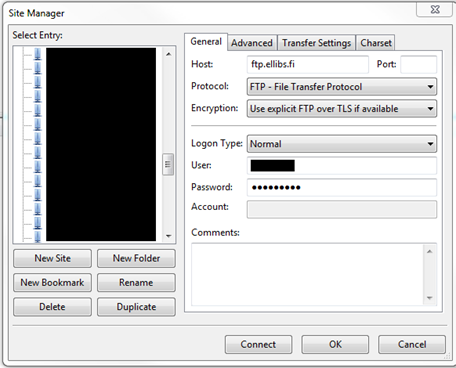
2. Connect to Ellibs’ FTP server
Click on the “Connect” button to log in to Ellibs’ FTP server. After logging in, your computer’s contents will appear on the left side of the screen, and the FTP server’s contents will be visible on the right.
3. Create a new folder on the FTP server
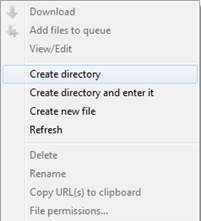
To create a folder, right-click and select ”Create directory”.
Name the folder using the current date, e.g. 20250624 or 2025-06-24.
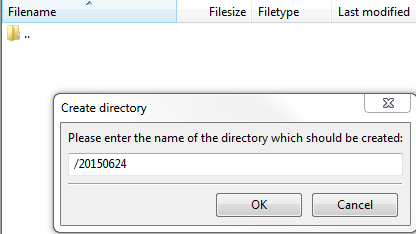
4. Upload your files to the folder
Once the folder has been created, use the left-side view to find the files (on your computer) that you want to upload to the FTP server. Select your files, then drag and drop them into the folder you just created to upload them to the FTP server. You can check the status of your file transfer in FileZilla by clicking on ”Successful Transfers” at the bottom of the app window.

5. Close the connection
Once you have checked that all the files you want have been uploaded to the FTP, you can close the connection by closing the program. The files have now been transferred to Ellibs and are waiting to be distributed.